How do I configure IMF Tune to only insert the SCL rating in emails ending in the junk email folder?
You may setup this as follows:
-
Check the following FAQ to make sure that routing of emails to the Junk email folder is correctly setup and to determine the current Junk Email Threshold:
How do I configure emails to be deposited to the junk email folder?
-
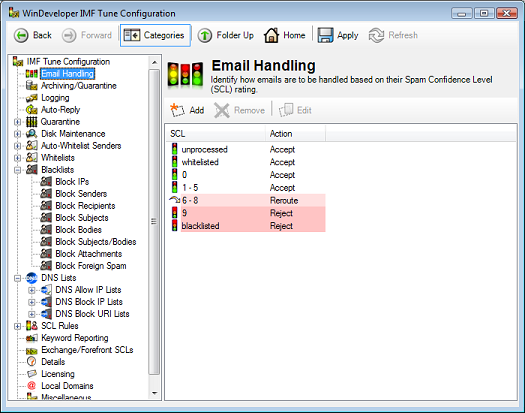
Open the IMF Tune configuration, Email Handling category.
-
Click on Add to insert a new SCL range.
-
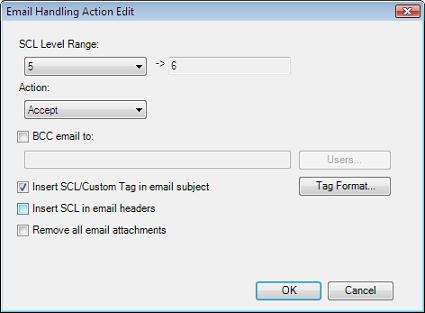
This opens the Email Handling Action Configuration dialog.
To set the lower SCL range limit we refer to the Exchange Junk Email Threshold identified in step 1. If the threshold was set to 4, then emails with SCL values greater than 4 would end up in the junk email folder. Thus at IMF Tune the range of interest will have the lower limit set to 5.
Set the action to Accept in order to let the emails reach the recipient mailbox.
Select the 'Insert SCL/Custom Tag in email subject' checkbox.
Click on OK to close and confirm changes for this SCL range.
Click Apply to commit changes.
Open the junk email folder through an email client such as Outlook or OWA. Newly processed emails within the configured SCL range will have the SCL inserted in their subject.