Exchange 2007/2010/2013/2016/2019 Support
Extensive Exchange version support including all of Exchange 2007, 2010, 2013, 2016 and 2019. Server platform support includes Windows 2008 R2 up to Windows Server 2019.

Extensive Exchange version support including all of Exchange 2007, 2010, 2013, 2016 and 2019. Server platform support includes Windows 2008 R2 up to Windows Server 2019.
Run spam filtering on ANY platform, firewall appliance, external service provider without losing Exchange integration.
Expose SCL ratings to all users from the server. Insert an SCL subject tag or add a custom header.
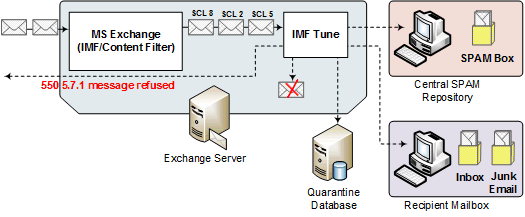
Retain all emails within a single repository. Eliminate disk archiving and access filtered spam from Outlook.
Configure individual SCL ratings or ranges with a unique set of options including archiving, logging, attachment stripping, subject tagging, auto-replies, rerouting, rejection, deletion and more.
Construct rules by combining multiple conditions and exceptions to accurately identify legitimate and spam emails.
Influence the email filtering logic. Identify keywords that should lead to higher or lower SCL ratings.
Let IMF Tune dig all the information for you to express the most effective email filtering criteria.
Let IMF Tune automatically discover the foreign contacts your users are exchanging emails with. Subsequent emails are automatically whitelisted relieving you from manual configuration.
Subscribe to DNS List providers to block/allow emails or just raise/lower the current spam rating.
At the server maintain global and per user white/black lists. Identify legitimate emails and spam by IP, sender, recipient, subject, any email header, body keywords, attachment names and more.
Block/Allow email delivery by attachment name or attachment media type.
Retain copies of blocked emails on disk. Optionally publish Quarantines to an SQL Database. Let IMF Tune automatically manage the email archive, compressing, backing-up and deleting old emails.
Install the included IIS Web Moderator/Reporting interface for the Quarantine system to be accessible from anywhere. The moderator supports the latest version of all major browsers.
From the browser, access real-time reports to monitor the filtering effectiveness. See how emails are being rated, the rejection rate, the list of top spam sources and many other reports.
Keep record of each email, including any actions applied, the source IP, addresses, subject and SCL rating as a concise audit trail.
Explore the interface and configuration options.